Bravo Bands Explained: The Purple and Blue Clouds
The Bravo Bands put a purple cloud above price and a blue cloud below it. What each cloud means, how I read them, and what they can't do.

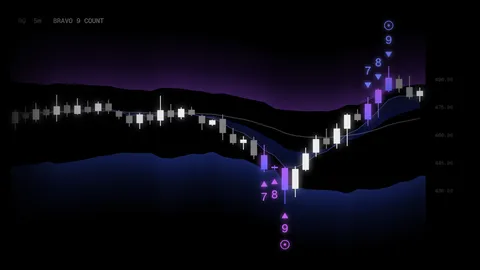
The Bravo Bands are the two clouds on my chart: purple on top, blue underneath. They're the first thing people ask about when they see my screen. Here's what they show.
What the Bravo Bands are
The Bravo Bands are two clouds on your chart: purple above price, blue below it. When price pushes into one of them, pay attention. I built them with ChartPrime as part of the Bravo Kit.
ChartPrime builds them from Fibonacci-weighted averages that react quickly to price. You don't draw anything: the bands move with price on their own.
The purple cloud
When price pushes up into the purple cloud, it has run high compared with where it's been. A drop may be next.
The blue cloud
When price pushes down into the blue cloud, it has run low. A bounce may be next.
Between the clouds
Most of the time, price sits between them. That's the normal range, and the bands aren't telling you much there. The useful moments are at the edges.
How I read them with the rest of the kit
The bands work best with the other tools in the kit:
- The Bravo 9 Count. A 9 printing while price is in a cloud is a stronger heads-up than either one alone.
- The trend lines. In an uptrend, above the 200-day line, a dip into the blue cloud is the kind of pullback I watch for. In a downtrend, the picture flips.
The Bravo Pro Screener, which comes with ChartPrime Pro, checks the Bravo Bands reading across your watchlist, so you don't have to open every chart.
What they can't do
- Notice I said "may." Price can ride a cloud for a while before it turns.
- The bands show where price is now. They don't know what happens next.
- They never replace your risk rules. Set your stop before you enter.
Trading is risky, and you can lose money. This is education, not advice to buy or sell.
Where to get them
The Bravo Bands come in the Bravo Kit on ChartPrime. See them on an example chart on the tools page, and learn how I set them up and read them in the course.
Sources
- 01ChartPrime, the J Bravo Kit guidedocs.chartprime.com
The routine I teach, step by step.
The Stock Glitch: the system I use, in short lessons you watch at your own pace.
- One payment
- Access now
- 30-day refund